
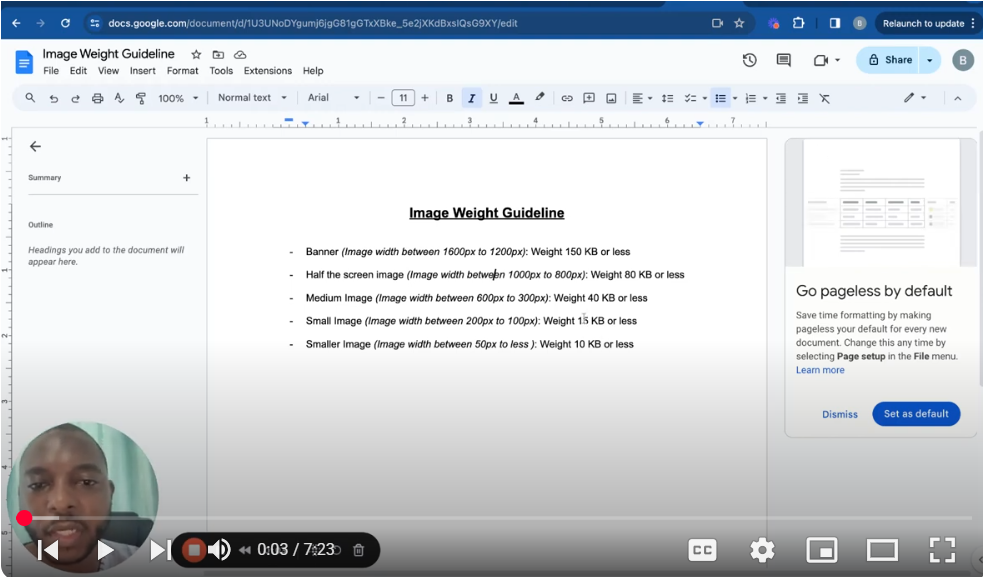
🚀 Welcome to our comprehensive guide on optimizing images to enhance page load performance for websites and applications. Image optimization is a crucial step in web development, significantly affecting site speed, user experience, and SEO rankings. In this video, we delve into the best practices for compressing images without sacrificing quality, focusing on the ideal image sizes and formats for different uses on your website. 🚀 Key Takeaways: Image Size Guidelines: Learn the optimal sizes for various types of images, from banners to icons, ensuring they contribute to a swift page load without compromising visual quality.
- Banner Images:
Aim for a width of 1.6 to 1.2 and keep the file size under 150KB.
- Off-Screen Images:
Ideal for widths between 1000 to 700 pixels, with file sizes not exceeding 80KB.
- Medium Images:
Best kept between 600 to 300 pixels in width, with a maximum size of 40KB.
- Small Images:
For images around 200 to 100 pixels wide, limit file size to 15KB or less.
- Icons:
Tiny images or icons less than 50 pixels wide should be 10KB or less.
- Choosing the Right Image Format:
Discover why WebP is the preferred format for its superior compression and quality capabilities compared to traditional formats like JPEG and PNG.
- Tools for Image Conversion:
Explore online tools and resources for converting images to WebP format, ensuring they are optimized for web use.
- Responsive Images:
Understand the importance of making images responsive, so they adapt to different device screens, enhancing the user experience across all platforms.
- Google Lighthouse and WebPageTest:
Learn how to use these tools to analyze your website’s performance and receive specific recommendations for image optimization.
🔗 Helpful Resources: In the video description, you will find links to Google’s guidelines on properly sized images, Mozilla’s documentation on responsive images, and tools for converting images to WebP format.
🛠️ Practical Tips: Always start with high-quality images and then compress them for web use. Use CSS and JavaScript techniques for lazy loading images, which can further improve page load times. Regularly audit your website’s performance with tools like Google PageSpeed Insights to identify and fix image-related issues.
👍 Support Our Channel: If you found this video helpful, please give it a thumbs up, share it with fellow developers or webmasters, and consider subscribing to our channel for more guides on optimizing your web development projects.
💬 We’d Love to Hear from You!: Have any questions or tips of your own on image optimization? Drop a comment below, and let’s discuss the best practices for keeping our websites fast and efficient! SUBSCRIBE https://www.youtube.com/@BACHOTMPUNGA… Need help? Ping me on LinkedIn / bachot-mpunga-bashala-b834191b
Leave your comment